How to Check Asaan Karobar Card Application Status and Issues
Asaan Karobar Card is an interest-free loan scheme announced by the CM of Punjab, Maryam Nawaz Sharif. Its parent goal is to help small entrepreneurs of Punjab to build their new and existing businesses. It covers up to 10 lac PKR in loans offered by the Government of Punjab. For loans upto 3 crore, you can apply for the Asaan Karobar Finance Scheme. If you have applied for the AKC Scheme and now want to check the Asan Karobar Card application status, here is a step-by-step guide to check the status.
Check Asaan Karobar Card Application Status
To check your application status for AKC, follow all the steps given below.
Step 01: Login in Asan Karobar Card Portal
Click the login button on the Asan Karobar Card official website. It will navigate you to the Asaan Karobar card portal. Now, put in your login credentials, which are your CNIC card number and the password you set up at the time of registration.
Step 02: Application Form
Now check your application form.
Step 03: Check Asaan Karobar Card Application Status
You can check your application status in the portal’s top section, which is the green area. It is showing different application checks. You can also check the application status of Asaan Karobar Finance.
Depending on the application status of your application. You can check if it is verified or has any errors. You can also check PSID if it is paid.
Step 04: Check for Updates
Check regularly by logging in to your portal, and you can also check this page for further updates related to the scheme.
Application Submission Deadline for Asaan Karobar Card
Application submission is stopped right now. Maybe in the future it will open again because it will work in phases. So there is no specific deadline given.
Asaan Karobar Card Verification Errors & Solutions
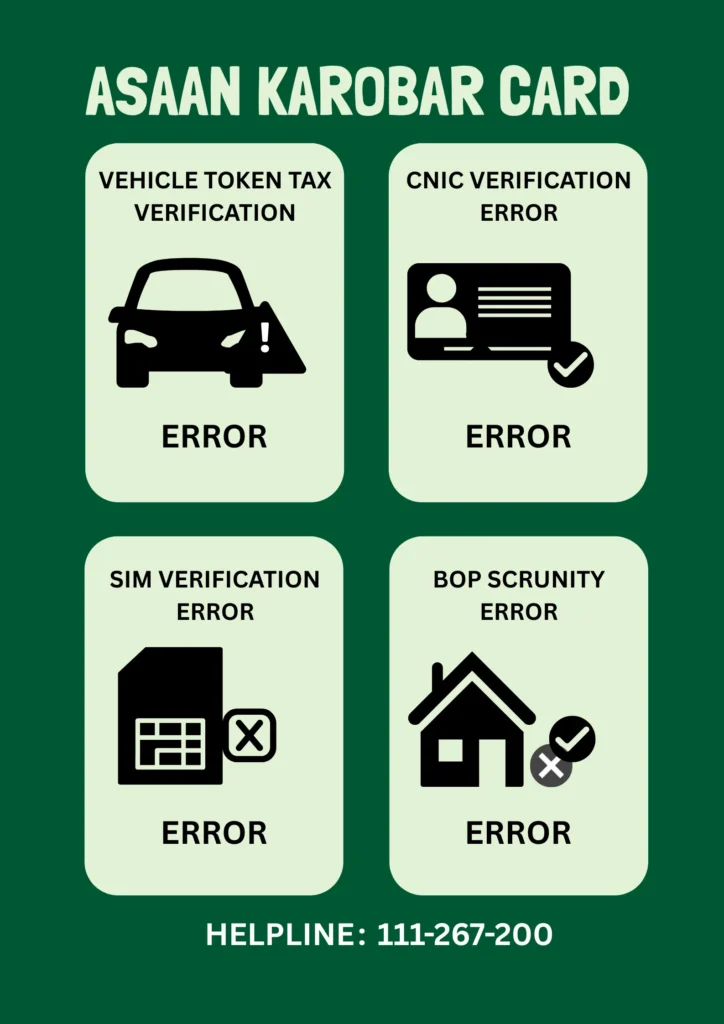
Vehicle Token Tax Verification
If this portion of the section shows any error, it shows that there must be an issue with the excise records. Maybe you have not paid any tax or challan. So, pay immediately to make your record better. You can visit any Khidmat Card Center to check your dues or the status of excise payments.
Solution
Just clear your record; its status will be changed immediately. You can call the helpline given below for more details.
CNIC Verification Error
It means there is an error with your NADRA record, or maybe you have entered incorrect details of your CNIC, like (CNIC NO, Name, Place)
Solution
Double-check your entered details of the ID card. Please correct your details, like name, place, or expiry date of your CNIC. If you have not submitted the last step of the application, you can edit your application. Otherwise, you have to call the helpline and ask them to clear the error.
SIM Verification Error
SIM verification error means either you have given the wrong number or the SIM is not registered in the name of the applicant.
Solution
First of all, you should enter the details of the registered SIM number against your CNIC. But there is also a solution if you have entered incorrect details. You can edit your phone number if you have not submitted your application yet. You can call the helpline if you have submitted an application with the wrong phone number. You can still transfer ownership to you.
BOP Scrutiny Error
It means the bank has not scrutinized your bank details yet, or maybe you are a defaulter of the bank, or you have applied for another loan in the bank. You must have a clean credit record.
Solution
Wait for 4-5 days to have your application scrutinized by the Bank of Punjab. You can visit a nearby bank branch to get more details. You can also call on the bank helpline (111-267-200) or the Asaan Karobar Card helpline given below.
How to Check If Your Asaan Karobar Card Application is Rejected?
Log in to your Asan Karobar card portal and check if it is showing a null status. It means your application is rejected due to some issues, or maybe you did not meet the criteria for the loan. You can call a helpline for further assistance.
Check Asaan Karobar Card Application Status Meaning of Terms
| Status | Meaning |
| Under Process | Under verification |
| Verified | approved |
| PSID Null | Maybe rejected |
| Status Null | Technical error |
Helpline Number
You can call the toll-free helpline for further assistance. You can ask your questions and seek help from this helpline number.
FAQs
Conclusion
You can check Asaan Karobar card application status in your portal by simply logging in. You will see status on the upper side of the portal. Further, you can check the above process for all errors or mistakes and their possible solutions. Don’t panic; just act on simple steps to get your application approved.